
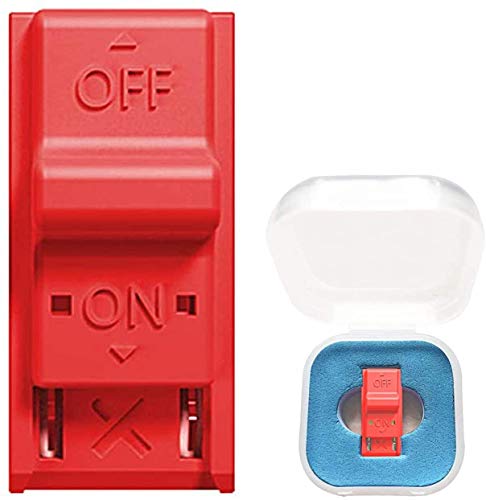


RCM Jig, RCM Clip Tool Short Connector for N-Switch Joycon Jig Dongle for NS Recovery Mode, Used to Modify the Archive…
Make sure this fits by entering your model number.
✪This product is a tool, RCM Jig for N-Switch. This is not a 3D-Printed paper clip jig. After specially modified to play games and other home-made software. Used to modify the archive, play the simulator such as GBA/FBA.
✪Connect your RCM Jig to the Right-Hand Joycon rail of switch. Then hold VOL press the Power Button. The RCM template reduces the risk of damage to the Joycon terminals on the switch.
$4.87
The RCM Jig allows you to enter into RCM(Recovery Mode) on your Switch. It can be used to modify the archive, play GBA / FBA and other simulators, the homemade system can already load Switch games. It is compatable with NS/SX OS RCM Jig is easy to use and install. Connect your RCM Jig to the Right-Hand Joycon rail of switch. Then hold VOL+ press the Power Button.
Specifications
Material: ABS plastic
Suitable: for N-Switch RCM / NS SX OS
Size: 3.5 x 3.5 x 1.8 cm / 1.38 x 1.38 x 0.71 in
Weight: 6g
How to use RCM Jig?
1. long press NS power button, pop-up menu select “power option”,click “turn off”. Turn NS off completely.
2. Copy needed files to the root directory of your TF card
3. Connect your RCM Jig to the Right-Hand Joycon rail of switch.
4. Then hold VOL+ press the Power Button.
5. NS is still in black screen, but already enter into RCM.
6. Connect your NS and computers/Android phones/dongle and inject the boot program via the microUSB Cable.
7. Guide you to the TF card system, you can run a variety of homemade software, systems, games.
Make sure this fits by entering your model number.
✪This product is a tool, RCM Jig for N-Switch. This is not a 3D-Printed paper clip jig. After specially modified to play games and other home-made software. Used to modify the archive, play the simulator such as GBA/FBA.
✪Connect your RCM Jig to the Right-Hand Joycon rail of switch. Then hold VOL press the Power Button. The RCM template reduces the risk of damage to the Joycon terminals on the switch.
✪Allows you to enter into RCM(Recovery Mode) on your Switch.
✪Made of ABS plastic, durable. Easy to use and install.
✪If you have any questions, please feel free to contact us. We will give you a satisfactory answer.
Specification: RCM Jig, RCM Clip Tool Short Connector for N-Switch Joycon Jig Dongle for NS Recovery Mode, Used to Modify the Archive…
|
User Reviews
Be the first to review “RCM Jig, RCM Clip Tool Short Connector for N-Switch Joycon Jig Dongle for NS Recovery Mode, Used to Modify the Archive…”
Related Products
![Ferilinso [6 Pack] Camera Lens Protector for iPhone 14 Pro iPhone 14 Pro Max Accessories Camera Cover 9H Glass…](https://m.media-amazon.com/images/I/51nXN5ssdgL._SS300_.jpg)



$4.87
There are no reviews yet.