You’ve probably noticed that there’s a lot of fear swirling around AI in photography right now.
Some worry that automated tools like those in Luminar Neo will replace the photographer’s role, making skills obsolete and flooding the space with cookie-cutter edits.
I know a few professional photographers are worried about this.
It’s a valid concern, especially if you’ve spent years mastering the art of taking photos and editing.
However, here’s the thing: AI in editing isn’t here to take over. It’s here to help.
In this article, I’ll help you feel more comfortable about using AI in your photography workflow, whether you’re a professional or an amateur.
By the end of it, I can guarantee that you’ll at least enjoy your image-creating process even more, so let’s get stuck in.
How Luminar Neo’s AI Tools Can Provide a Creative Edge
AI as a New Set of Tools
Luminar Neo is a groundbreaking photo editing app that incorporates some cutting-edge AI tools. (Read our full review of it here.)
Its AI features aren’t some mysterious force out to hijack your creative vision.
They’re just tools, much like the shift from manual focus to eye-tracking autofocus or from film to digital.
When eye-detection arrived in cameras, it didn’t eliminate skill; it simply gave us more reliability and speed.
We still choose the shot, the moment, and the settings. The tech just made the mechanics easier.
In fact, I remember my son-in-law (who was a professional wedding photographer at the time) commenting that using the eye-detection feature on his Sony a7III was like ‘cheating’ – it made his job that much easier.
And now, that’s exactly what Luminar’s AI is doing for editing.
Efficiency Without Compromise
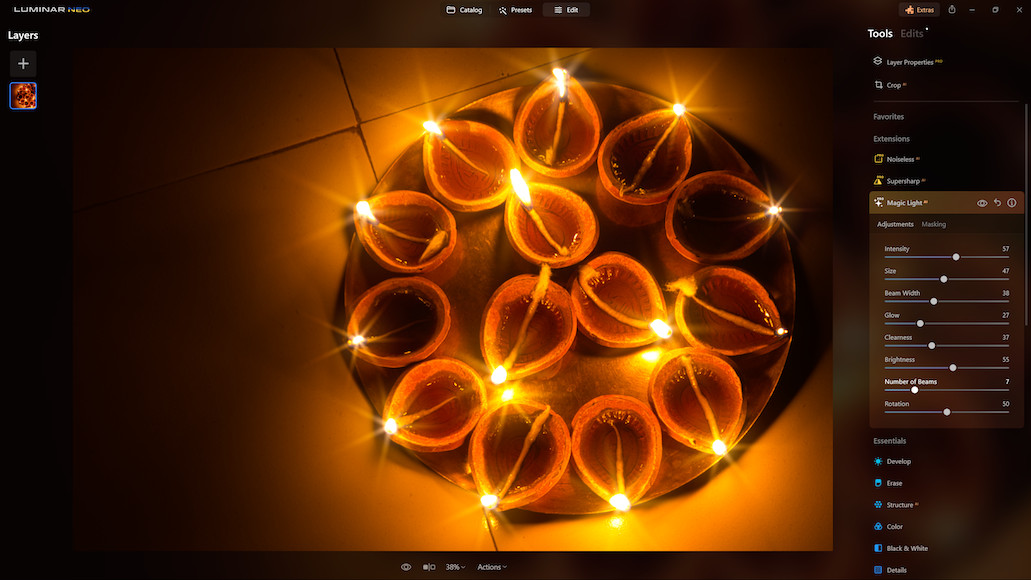
AI tools in Neo, like Enhance AI, Relight AI, and Sky AI, aren’t compulsory – you don’t have to use them.
You can use them lightly, as a base, or not at all.
They’re optional boosts that can speed up the early stages of editing, or help you experiment in ways that would’ve taken hours manually.
For working photographers, that can mean faster client delivery. For hobbyists, it means spending more time shooting and less time wrestling with sliders.
In my workflow, I generally start in Lightroom Classic. However, I’ll occasionally dump all the photos into Luminar Neo and apply Enhance AI… which brings me 99% of the way there – often, 100%.
With all the AI tools available in Neo, you’re still the one making the calls. The software just moves things along faster.
Control at Every Step

One of the best things about Luminar Neo is that AI doesn’t lock you in.
You can override, fine-tune, mask, or blend any adjustment manually.
It’s not like hitting a preset and hoping for the best, like you probably did in Lightroom Classic for so many years.
With the AI tools in Luminar Neo, you’ve got full control over what the AI does and how much of it you keep.
In fact, many of the AI tools are great starting points. They can show you what’s possible, then let you refine the result to match your own style.
Leveling the Playing Field… or Just Changing It?

There’s a lot of talk about AI “leveling the playing field” and making it too easy for beginners.
And sure, some of the technical barriers are now lower…. but creativity was never about difficulty.
Having access to smarter tools doesn’t replace taste, composition, timing, or storytelling.
Just like owning a high-end camera doesn’t make you a good photographer, using AI won’t automatically make your edits meaningful.
It simply gives more people the chance to get better results, faster.
Coming from an editing background, you, as the experienced photographer, will be able to use AI in a way that a complete novice cannot.
It’s the same with all these new AI coding tools. I’ve played around with vibe coding, and while the results are impressive, a developer using something like Cursor.ai can take it much further than a complete novice like me.
A New Kind of Creative Workflow

Using AI in Luminar Neo doesn’t mean giving up creative control – it means reshaping your workflow around tools that are faster, smarter, and increasingly more intuitive.
You can still take your time, build edits layer by layer, and fine-tune every curve.
But you also have the option to let AI handle the groundwork so you can focus on colour grading, storytelling, or delivering a consistent look across a batch.
You can also offload the typically time-consuming (and tedious) editing jobs like replacing dull skies for beautiful sunsets, or eradicating wrinkles from a subject’s face.
Final Thoughts
AI isn’t replacing photographers – it’s evolving with them.
Like every wave of technology before it, it’s about efficiency, not complete erasure.
You can still do everything manually in Luminar Neo if that’s your thing. You can use it by sliding sliders to your heart’s content.
In my opinion, if you choose to use AI tools, you’re not surrendering control. You’re actually working smarter.
The creative equation hasn’t changed – you’re still at the centre of it, so embrace the helping hand to level up your skills as well as the final product.
Credit : Source Post