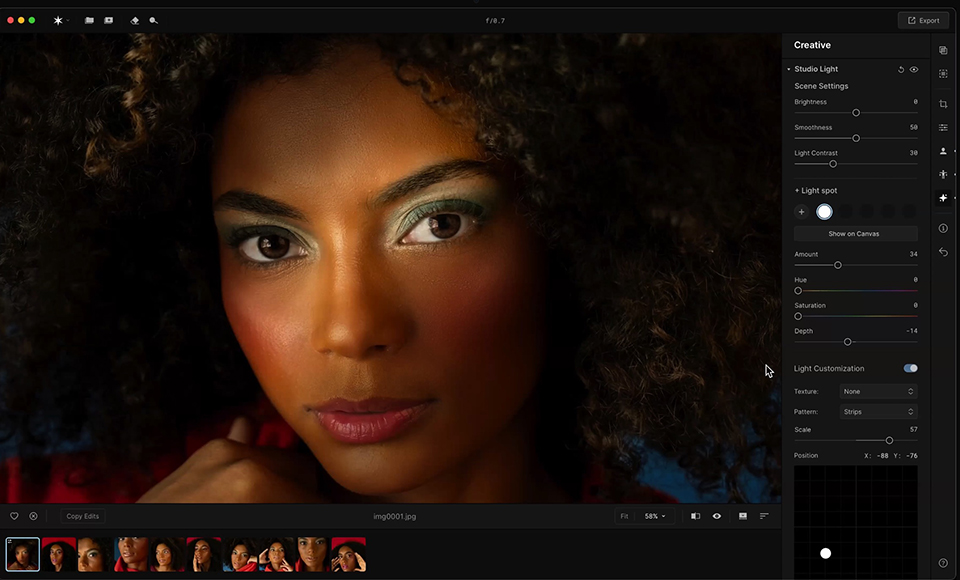
Portrait editing is one of those things where everyone’s got their own rhythm.
Some photographers are looking for speed and consistency, while others want complete control and a more nuanced, artistic process.
I’d say I’m somewhere in between, needing speed some of the time and complete control at other times.
Luminar Neo and Aperty both offer solutions for portrait editing, but the way they approach the task is quite different.
Highly Recommended

Suite of powerful editing apps with both AI and manual tools that take your photography to the next level.
Let’s break down how each of them performs when it comes to editing portraits, and look at their specific strengths and weaknesses.
I’ll also discuss whether it’s worth using both as part of your workflow.
Luminar Neo vs Aperty for Portrait Editing
The Basics: Style versus Precision
Luminar Neo focuses on AI-driven speed and simplicity, offering enough manual tools to give you a creative edge when you need it.
Aperty, on the other hand, is more minimalist in its design, but it delivers a high level of control and layering that feels closer to traditional retouching software.
After all, Aperty is a portrait-focused photo editor that’s been designed from the ground up to accelerate and simplify your retouching. (Check out our full review here.)
In short, Luminar is ideal for photographers who want polished results with minimal effort, while Aperty caters to those who enjoy digging into the finer details of an image.
Portrait Editing in Luminar Neo
If you’re already using Neo, you’ve got some powerful portrait tools at your disposal.
Face AI, Skin AI, and Bokeh AI make it incredibly easy to enhance skin, brighten eyes, and create that shallow depth-of-field look that can really elevate a portrait.
I use these tools often when editing photos of the grandkids, quick family sessions, or gift prints, and they help save a lot of time without sacrificing quality.
Luminar Neo might not be the software you’d reach for if you were retouching a fashion shoot, but for most everyday portrait needs, it definitely holds its own.
If you want more creative control, you can bring in tools like Supercontrast or Relight AI and use masking to target specific parts of your image.
The layer system in Neo is also more capable than it first appears, letting you stack adjustments and experiment freely without affecting your base image.
The layers bring Neo closer to Adobe Photoshop, without bringing in the complexities that put many photographers off Adobe’s popular software.
Portrait Editing in Aperty

Aperty isn’t trying to compete with Neo on automation or user-friendliness – after all, they’re both made by Skylum, so why would they?
Instead, Aperty is all about giving you complete control over tonal balance and skin work, with an emphasis on clean, professional results.
You won’t find instant sliders to smooth skin or brighten eyes like you do in Neo.
Instead, Aperty gives you tools for manual dodge and burn, tonal separation, and selective colour grading.
It feels slower, but also more precise. These are tools for professionals that have been simplified enough for hobbyists like me to use.
One of the things Aperty does really well is structure.
You can stack non-destructive adjustments and label each one clearly, making it easy to go back, tweak, or reverse a step without affecting the rest of your work.
It also supports more advanced techniques like frequency separation and manual lens correction, which will appeal to photographers doing high-end client work.
Which Editing Software Is Best for Portraits?
If you’re looking for fast, attractive edits that still give you some room to customise, Luminar Neo is probably your best bet.
It works especially well for family portraits, lifestyle shoots, and hobbyist photographers who want to enjoy the process without getting bogged down.
The bulk edits feature is also a massive time-saver if you need to adjust multiple images shot in similar lighting conditions.
However, if you’re doing professional portrait work, or you’re the kind of editor who enjoys getting everything just right, Aperty has the edge.
It gives you the tools to refine every part of the image, even if it takes a bit longer.
Do You Need Both Aperty and Luminat Neo?
If you already own Luminar Neo, Aperty isn’t essential unless you’re starting to feel limited by the AI-driven workflow or you want finer control over how your edits are applied.
You can get excellent results in Neo for most portrait work, especially if your focus is on speed and visual impact.
If you’re starting to work with clients or want to level up your retouching skills, however, Aperty fills in the areas where Neo holds back.
If you already use Aperty, you might still find value in Neo’s quicker workflow and AI tools for batch editing or casual shoots.
If you’re fortunate enough to own both pieces of software, you’ll find that they actually complement each other quite well.
Final Thoughts
For casual and semi-pro photographers who want good-looking portraits without spending hours per photo, Luminar Neo is an easy recommendation.
Its tools are smart, fast, and give you more than enough flexibility to grow your skills.
Luminar Neo is also a fun and intuitive editing software to use, with legions of happy fans.
Aperty is a deeper, more hands-on experience that rewards careful editing and a bit of patience.
If you enjoy the editing process and want full creative control, it’s worth exploring.
Both tools are capable of producing beautiful portraits: you just have to decide whether you prefer the streamlined route or the more detailed one.
Credit : Source Post