Introduction
Announced in January 2026, the Instax Mini Evo Cinema is the first ever 3-in-1 hybrid instant camera from Fujifilm, capable of recording short-form 15-second video clips, shooting stills and making Instax prints.
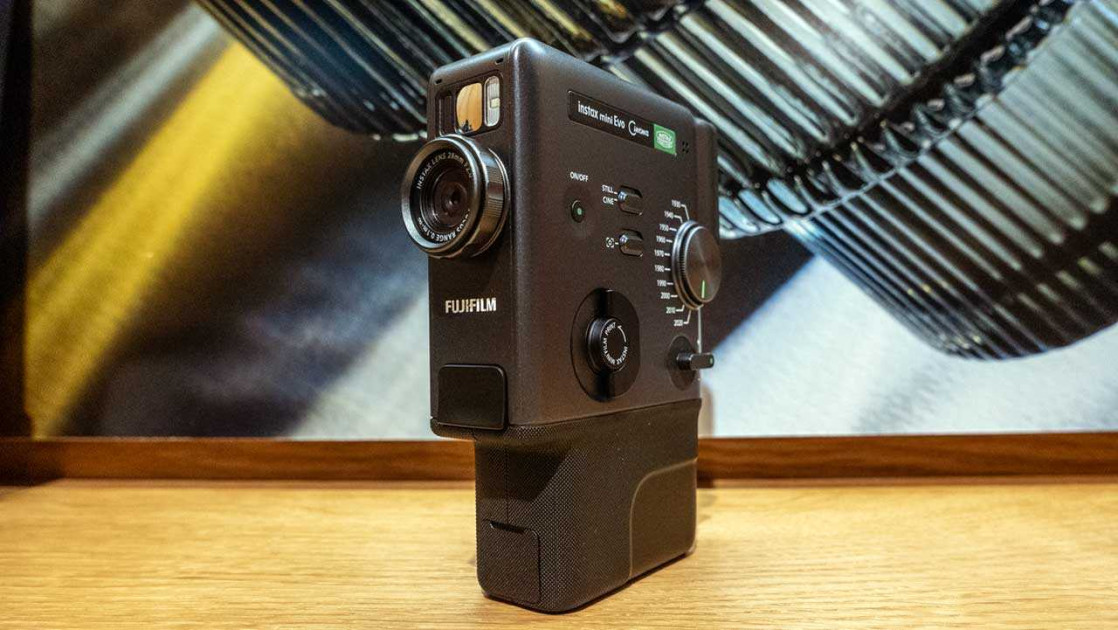
It has a classic, vintage retro design that recalls old-fashioned 8mm cine cameras from yesteryear, specifically the FUJICA Single-8 camera from 1965, complete with an Eras effect dial that cycles back through 10 decades from 2020 to 1930.
In conjunction with the Degree Control Dial, it provides 100 different combinations from 10 different Eras and 10 different effect intensity levels for each Era. You can then further personalise your stills or video clips by using the Frame Switch to add a frame.
It pairs a 5 megapixel digital stills and video camera with an inbuilt Instax Mini printer and has a 1.54-inch LCD screen, selfie mirror, self-timer, continuous flash, a USB-C charging port and a micro SD slot.
Inside the Fujifilm Mini Evo Cinema is a 1/5-inch CMOS sensor which is capable of producing digital images of 2560×1920 pixels. The fixed lens offers a 28mm equivalent focal length, with an f/2 lens.
Using the camera is pretty much entirely automatic thanks to the Program AE mode. The Instax Mini Evo Cinema automatically optimizes the shutter speed (1/4 second to 1/8000 second), flash output, ISO speed (100 to 1600) and other key settings according to the current shooting conditions.
Twist the Print Lever and a 54x 86mm (2.1 x 3.4in) Instax Mini paper print will emerge from the slot in the top of the camera and gradually fade into view 90 seconds after you first pressed the shutter button.
You can use the Mini Evo Cinema to print images from your smartphone (or indeed any image file found on your smartphone). You can also use your smartphone as a remote control and wirelessly release the camera’s shutter from the free Instax Mini Evo app, which is available for iOS and Android phone.
The camera uses Instax Mini film, which is available to buy in a couple few different varieties, including with a traditional white frame or various different fun colours, such as “Rainbow”, “Shiny Stay”, and “Candy Pop”, as well as monochrome packs for fans of black and white photography.
At the time of writing, a single pack of 10 sheets typically costs £8.99, but you can usually buy multi-packs for a lower cost per unit. For instance, a two pack is usually £14.99 each and a five pack of 10 sheets will set you back anything from £29.99.
The Fujifilm Instax Mini Evo Cinema camera is available now priced at £329.99 / S409.95 / €379.99 in the UK, USA and Europe respectively. Viewfinder and grip attachments and a premium hand strap are included in the box. A matching case is available for £34.99.
Ease of Use
 |
The main thing to say about the Instax Mini Evo Cinema is that it’s incredibly fun to use and a real breath of fresh air.
Being able to experiment with the ten wildly different Eras and apply them to video, stills and Instax prints is very addictive, with 100 different combinations possible thanks to the Degree Control Dial, and the extra option of adding era-specific frames being the icing on the cake.
Just as with the Film Simulations on their digital cameras, Fujifilm have obviously lavished a lot of love and attention on representing the various eras from 1930 to 2020. The key difference is they are not intended to be an accurate reproduction of a particular film stock from each era, rather Fuji’s take on creatively capturing that era as a whole.
Each era has a very distinctive look that can be applied to both stills and video, even including the way that the audio is captured, which can be toned up or down using the Degree Control Dial. Most of this camera’s target audience may not remember anything other than the last couple of decades, but they will definitely be intrigued by the range of vastly different looks on offer.
 |
In keeping with the decade-specific retro output, the Mini Evo Cinema has a uniquely retro design that echoes 8mm cine cameras from the 1960s.
With a portrait orientation and a pistol grip so that when the Instax prints are revealed, the larger part of the frame will be at the bottom, it’s predominantly meant to be used one-handed, although you can still rather awkwardly turn it on its side if you want to to capture landscape format stills and video.
The Mini Evo Cinema is one of the larger cameras in the Instax range, measuring 39.4 x 132.5 x 100.1mm.. It’s not very pocket-friendly because of its vertical shape, so you will need a small bag to store it in.
It’s not particuarly heavy though thanks to the all-plastic build quality, weighing in at 270g without batteries, strap, and film. Ideally you won’t ever drop it (!), but it is robust enough to survive a small drop if you do.
 |
The single shutter button on the front is positioned underneath the lens and naturally falls under your right forefinger. If you find that the built-in grip is too small, there’s a grip accessory attachment included in the box which definitely helps for the larger-handed people out there.
The lens on the front is exactly the same as the one used in the Instax Mini Evo – a fixed focal length, 28mm, F2.0 lens.
It’s surrounded by the circular Degree Control Dial which is used to cycle through the 10 different effect strengths, with the camera emitting an audible click and displaying a vertical scale on the LCD screen as you do so.
Above the lens is a small mirror which you can use to help you accurately line up selfies, an AF assist lamp and the flash unit, which can be switched to auto (for stills), On or Off from the menu. If you set it to On for video, the flash surprisingly works as a continuous light source which proves very handy for filming certain subjects.
Right at the bottom of the hand-grip is a plastic cover which protects the USB-C port for charging and the Micro USB slot for storage. There’s also a factory-reset button in the same compartment.
 |
This camera uses a non-removable Lithium-ion battery that when fully charged after 2 to 3 hours can print approximately 100 Instax prints (unfortunately Fujifilm don’t provide any CIPA ratings for recording video or the number of stills). The flash on the front of the camera will light up to let you know it’s charging, switching off when it’s complete.
The Instax Mini Evo Cinema has its own built-in internal memory that can store approximately 50 shots or 10 video clips, which is only really enough to get started with, so you’ll want to budget for a microSD/microSDHC/microSDXC memory card (up to 256GB).
This is especially important if you’re interested in shooting the best quality 1080×1440 video in the 2020 era, as it’s only available if a microSD is inserted.
On the rear of the Instax Mini Evo Cinema is a small 1.54-inch LCD screen which is just about large enough to clearly display the various icons and menu options to the left and right of the frame. Whilst small, the 170,000-dot resolution is high enough to accurately represent what the camera is recording, something that can’t be said for most Instax cameras.
If you can’t see the LCD screen in bright sunlight or you want to hold the camera up to eye-level for a more immersive experience, simply fit the Finder Attachment that’s included in the box.
 |
Beneath the LCD screen is a simple array of buttons encompassing Back, Menu, OK and Playback. There’s even a circular scroll wheel that will quickly move through the menu items or images in the playback mode.
Unfortunately the camera isn’t so quick to turn-on, infuriatingly taking a long-press of the On button and around 4 seconds before its ready (or not) for action, resulting in some missed opportunities. This is annoyingly coupled with the sleep function which powers the camera down after a rather short period of idleness in the interests of maintaining battery life.
Some of the main creative controls of the Instax Mini Evo Cinema can be found on its left-hand flank, including the aforementioned Eras dial and the Frames switch.
The large Eras dial has options running from 1930 through to 2020 with a distinct click emitted as you move through them. You’re forced to change slowly, though, as the camera inexplicably takes around 5 seconds to switch between eras, complete with a busy icon displayed on the LCD screen.
The other controls found on this side of the camera are the On/Off button, a vertical switch for changing from Still to Cine mode, a lever for the digital zoom, and an amusingly retro lever that must be fully twisted through 90 degrees in order to print a photo – sure, the same thing could have been achieved with a simple button, but where’s the fun in that?!
 |
On the right-hand-side of the camera is a door for the film slot. Slide across a switch to open the film door when you want to insert a new pack of Instax film. The switch on our review sample was annoyingly sticky, though, often not releasing the door without some swearing, so make sure to check yours when you buy it.
Instax film is incredibly simple to use – all you need to do is line up the small yellow line on the Instax film with the same yellow line on the camera and close the door when it’s in place. Be careful not to accidentally open the film door once you start using the film though, as you’ll risk exposing and ruining the film.
Before you get started and whenever you insert a new film cartridge, you’ll need to take a single shot to eject the safety sheet from the cartridge, which you can then throw away.
As the name rather obviously suggests, this is the first ever Instax camera to offer video recording as well as stills, although what it has to offer in this department is rather basic by 2026 standards.
In the CINE mode, you can shoot a series of rather low resolution 600×800 pixel clips – each one up to a maximum of 15 seconds in length – and the camera will automatically stitch them into one smooth 15 second video. You can also use the instax mini Evo app to create longer 30 second videos by adding, trimming and reordering clips.
One operational quirk is that you have to hold the shutter button down for the entire duration of the video recording – you can’t more simply press it once to start and again to stop.
 |
Fujifilm have extended the QR code aspect of previous Instax cameras to now include video as well as stills. So you choose a video and decide whether ot not to include a QR code in one of its corners, make an Instax print, and then other people can scan the QR code to access that video via their smartphone.
On the bottom of the camera is a 1/4″ tripod socket, which as with most of the user interface is optimally positioned for when the Instax Mini Evo Cinema is in portrait mode, and plastic lugs for attaching the included hand strap.
The Instax Mini Evo Cinema is designed to work with a companion smartphone app, which is available to download for free. You can connect to the Mini Evo Cinema via Bluetooth or WiFi, and for the most part it connects quickly and seems to remain stable once the initial connection and setup has been completed.
From the app you can perform a number of useful functions, including taking remote control of the camera (useful for selfies and group shots).
One important limitation to be aware of is that the Mini Evo Cinema only saves images that you’ve actually printed into the app, not every photo that you’ve taken – so if you’ve filled up the built-in memory with 45 images, but only printed 10 of them, only those 10 will be saved in the app.
 |
We’ve no real idea why this limitation exists, and hope that Fuji fix it in a future firmware upgrade. Until then you can work around it by copying the images from the built-in memory onto a memory card, or preferably by recording images to a microSD card and transferring them from that to another device, neither of which are as convenient.
One of the most useful app functions is the “direct print” option, which allows you to print any image which you have stored on your phone. This effectively turns the Mini Evo Cinema into a portable Instax Mini printer, and is a great way to use to print better photos than the onboard camera is capable of capturing.
Once an image has been printed out, you’ll need to allow some time for the Instax film to develop – in other words, don’t be alarmed when it pops out completely white. After a few minutes, the colours should have fully rendered.
The Mini Evo Cinema creates the highest-ever quality instax instant prints to date, printing at 600 dpi when printed directly from the camera.
The print slot is found on the top of the Instax Mini Evo Cinema so make sure it is unobstructed when you press the print button. A nice quirk is that the camera display will show a graphic of the print coming out from the screen.
Sample Images
This is a selection of sample images from the Fujifilm Instax Mini Evo Cinema camera, which were all taken using the 4.9 megapixel JPEG setting. The thumbnails below link to the full-sized versions, which have not been altered in any way.
Sample Movies & Video
Product Images


Conclusion
The Mini Evo Cinema successfully extends the winning Instax blueprint to include video as well as stills and printing – if you want an Instax product that can uniquely do it all, this is the one for you.
Sure, it’s also by far the most expensive Instax camera currently available, and the video function is rather rudimentary – 15 second, 600×800 pixel, 3:4 aspect ratio video clips don’t really cut it by 2026 standards, being too small even for social media reels and the like – but the Mini Evo Cinema is undeniably a lot of fun to use.
The introduction of Eras into the Instax recipe is particularly inspired at a time when people are seemingly endlessly fascinated by nostalgia, with every decade from the 1930’s to the 2020’s evocatively invoked at the simple (if rather slow) twist of a dial.
Add in the further ability to dilute or strengthen the look of each Era and the option to include period-specific frames for both stills and video and it’s very clear that Fujifilm are onto a sure-fire winner here.
At its technological heart the Mini Evo Cinema is reminiscent of 2022’s Mini Evo model, sharing the same 5 megapixel image sensor and 28mm F2.8 lens, but utilising a wholly new Cine-camera-like design that is surprisingly intuitive to use.
Only the sluggish start-up and Era selection times really detract from what is otherwise an impressively well-thought-out first-generation product that successfully mimics cine cameras from yesteryear.
What’s very modern is the price – at £329.99 / S409.95 / €379.99, it’s far too expensive to be considered an “impulse purchase”, but maybe just about affordable enough to be appealing to passionate Instax fans.
Overall, the Fujifilm Instax Mini Evo Cinema is an undeniably fun combination of past and present that successfully encompasses stills, videos and prints. Not without its operational quirks and technical limitations, not to mention that eye-watering price-tag, it’s still refreshingly unique and well-realised enough to warrant people’s ever more fleeting attention.

| Ratings (out of 5) | |
|---|---|
| Design | 5 |
| Features | 4.5 |
| Ease-of-use | 4 |
| Image quality | 3.5 |
| Value for money | 3 |
Main Rivals
Listed below are some of the rivals of the Fujifilm Instax Mini Evo Cinema.
The Instax Mini 12 is Fujifilm’s new entry-level instant film camera for beginners Now featuring automatic flash control, a close-up mode with parallax correction and a refreshed bubble design, is this the best introduction to the world of instant photography? Read our Fujifilm Instax Mini 12 review to find out…
The Instax Mini 99 is Fujifilm’s new instant film camera for discerning photographers. Is this the best Instax camera that Fujifilm have ever made? Read our Fujifilm Instax Mini 99 review to find out…
The new Fujifilm Instax Mini Evo combines a digital camera with an Instax printer to enable you to take photos and make instant prints from the same device. It also offers the ability to print images from your smartphone onto the Instax Mini film. Read our in-depth Fujifilm Instax Mini Evo review, complete with downloadable sample images, to find out if it’s worth the £174.99 / S199.99 asking price…
The brand new Fujifilm Instax Mini LiPlay+ pairs a digital camera with an Instax mini printer to take photos and make instant prints from the same device. It also introduces a selfie camera for the first time ever on an Instax camera. Read our LiPlay+ Review so far to find out more…
Blending old and new, film and digital, the innovative X half from Fujifilm is a camera like no other before it – but is it any good? Find out now by reading our in-depth Fuji X-half review complete with full-size sample photos and videos.
Review Roundup
Reviews of the Fujifilm Instax Mini Evo Cinema from around the web.
I tried the Fujifilm decades camera and I’m obsessed with the time-traveling dial – but there are some bugs.
Read the full review »
What’s really awesome about the Fujifilm Instax Mini Evo Cinema is what it does so much differently. It’s a cinema-first camera designed to also shoot stills and print Instax photos. Additionally, there’s a dedicated switch that allows you to change the way vertical-only video is rendered.
Read the full review »
Specifications
Camera Function
| Image sensor | 1/5-inch CMOS with primary color filter |
|---|---|
| Number of effective pixels | Approximately 5 million pixels |
| Number of recorded pixels | Still image capture: 1920 × 2560 Video capture/STANDARD: 600 × 800 Video capture/HIGH-QUALITY VIDEO MODE (2020 ONLY): 1080 × 1440 |
| Storage media | Internal memory, microSD/microSDHC/microSDXC (up to 256GB) memory card |
| Storage capacity | (Still Images) Internal memory: Approximately 50 shots When using microSD / microSDHC memory card, Approximately 800 shots per 1GB at 1920 × 2560 pixels (Video / STANDARD) Internal memory: Approximately 10 clips When using microSD / microSDHC memory card, Approximately 162 clips per 1GB at 600 × 800 pixels (each clip Approximately 15 seconds) (Video / HIGH-QUALITY VIDEO MODE (2020 ONLY)) Internal memory: 0 clips (Not supported) When using microSD / microSDHC memory card, Approximately 37 clips per 1GB at 1080 × 1440 pixels (each clip Approximately 15 seconds) |
| Recording method | JPEG DCF compliant Exif Ver 2.3 |
| Focus distance | f = 28mm (35 mm film equivalent) |
| Aperture | F2.0 |
| Auto focus | Single AF, Face recognition AF (on/off) (with auxiliary light) |
| Shooting distance | 10 cm to ∞ |
| Shutter speed | 1/4 second to 1/8000 second (automatic switching) |
| Shooting sensitivity | ISO100 to 1600 (automatic switching) |
| Exposure control | Program AE |
| Exposure compensation | −2.0 EV to +2.0 EV (1/3 EV step) |
| Metering method | TTL 256 split metering, multi metering |
| White balance | AUTO, FINE, SHADE, FLUORESCENT LIGHT, INCANDESCENT |
| Flash | AUTO FLASH/FORCED FLASH/ SUPPRESSED FLASH Shooting range with flash: Approximately 50 cm to 1.5 m |
| Self-timer | Approximately 2 seconds / approximately 10 seconds |
| Movie recording | MP4 MPEG-4 AVC/H.264 AAC |
| Movie frame rate | 24p |
| Movie bitrate | STANDARD: 2.5 Mbps HIGH-QUALITY: 9.0 Mbps |
| Eras Dial™ effect | 10 Eras Dial™ effects with degree control functions.(1930/1940/1950/1960/1970/1980/1990/2000/2010/2020) |
Print function
| Exposure pixel count | 1600 × 600 dots (800 × 600 dots when printed from smartphone app) |
|---|---|
| Exposure resolution | 25 dots/mm × 12.5 dots/mm (635 × 318 dpi, 40 × 80 μm dot pitch) 12.5 dots/mm when printed from smartphone app (318 dpi, 80 μm dot pitch) |
| Exposure gradation | RGB gradation of 256 colors |
| Printable image format | From the camera’s internal memory or microSD / microSDHC / SDXC memory card: JPEG images taken with this camera From a smartphone: JPEG, PNG, HEIF |
| Print output time | Approximately 16 seconds * Plus approximately 7 seconds when printed using instax-Rich Mode™ immediately after startup. |
| Print function | Images in the internal memory and images in the memory card can be printed |
Other
| Smartphone app linked functions | Smartphone image print function, remote shooting function, printed image transfer function, firmware upgrade function |
|---|---|
| Compatible App OS | iOS/Android (Please check the app download sites (iOS, Android) for availability, as the app may not be compatible depending on your smartphone’s operating system.) |
| LCD screen | 1.54-inch TFT color LCD screen Pixel count: Approximately 170,000 dots |
| External interface | USB Type-C port (for charging only) |
| Bluetooth | Bluetooth Ver. 5.4 (Bluetooth low energy) |
| Wireless Transmitter | IEEE802.11b/g/n (2.4 GHz band only) Encryption: WPA/WPA2 mixed mode, WPA3 Access Mode: Infrastructure |
| Power supply | Lithium ion battery (internal type: not removable) |
| Power consumption | Power Off: Approximately 0.3 mW Power On : Approximately 2.3 W (During video recording) |
| Auto power off function | 5 minutes / 2 minutes / Off * Deactivating the auto power off function will increase the energy consumption of the product. |
| Possible number of printed images | Approximately 100 (from full charge) * The number of prints depends on the usage conditions. |
| Charging time | Approximately 2 to 3 hours * Charging time depends on the temperature. |
| Main unit dimensions | 39.4 mm × 132.5 mm × 100.1 mm (excluding projecting parts) |
| Main unit weight | Approximately 270 g (Film cartridges, recording media, not included.) |
| Operating environment | Temperature: 5°C to 40°C Humidity: 20% to 80% (no condensation) |
| Film used | FUJIFILM instax™ mini Instant Film (sold separately) |
Your Comments
Credit : Source Post