Introduction
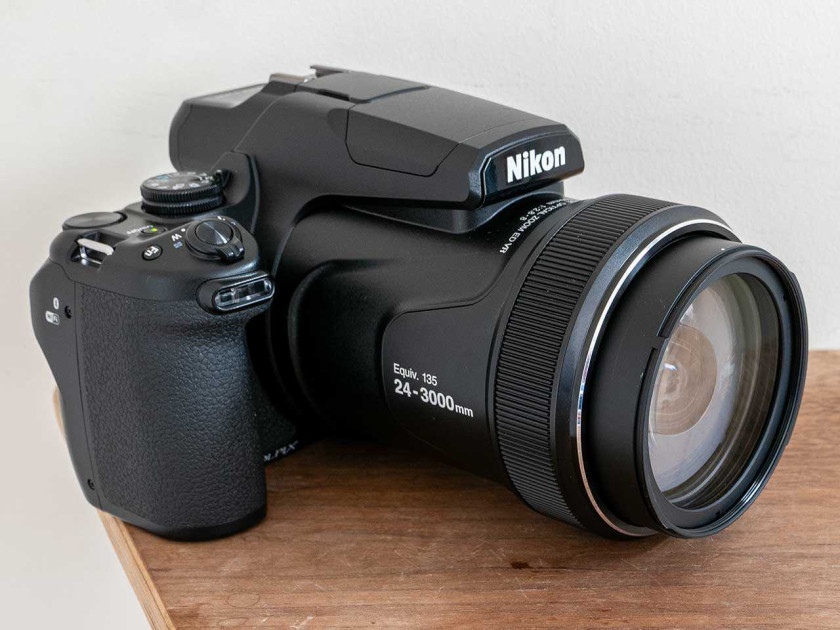
The Coolpix P1100 is a high-end, enthusiast-level bridge camera from Nikon. Its headline feature is its 125x optical zoom lens, which provides a 35mm equivalent zoom range of 24-3000mm, making it unsurpassed in the market.
It follows on from the Nikon P1000, which made its debut back in 2018. The two models are almost identical, so if you already own the P1000 there’s very little reason to upgrade to the newer version.
The key hardware differences are the P1100 has an EU-mandated USB Type-C port instead of a Micro-B USB port, Bluetooth 5.1 versus 4.1 on the older model, more secure WPA3-SAE wi-fi and connectivity, and ML-L7 remote Fn button compatibility.
Nikon have also added a few new software features to the P1100, namely a Fireworks Show mode, long exposure noise reduction control and a selectable AF-area mode.
The Nikon P1100’s key specifications include a 16 megapixel 1/2.3-inch sensor, an f/2.8-f/8 maximum aperture range, a 0.39-inch, 2359k-dot electronic viewfinder, RAW format shooting, manual controls and a 3.2-inch 921k-dot vari-angle TFT LCD.
Another thing about the Nikon Coolpix P1100 that made headlines when it was announced is its price – it currently retails for around £1049 / $1099, so it’s by no means a cheap or bargain proposition. It is made in Thailand.
Ease of Use
 |
There are two ways to think about the Nikon P1100. It’s either massive compared to every other camera you’ve likely used – certainly a bridge camera – or it’s tiny considering the fact that it’s packing a 3000mm zoom.
Either way, you’re certainly not going to be able to slip this into your pocket – even a bag you might struggle with. Of course because of the huge lens, the bulk of the camera is taken up by that, with a very wide lens diameter and very weighty feel to it.
Again, you might think it’s lightweight compared to carrying the equivalent DSLR equipment around, but this is by no means a discreet model – and it gets even larger when you zoom the lens out, too.
The Nikon P1100 is roughly DSLR-like in design, in that it has a deep, chunky grip, a familiar array of dials and buttons (familiar to DSLR users), and a viewfinder which sits in the middle of the back of the camera. The grip has a textured coating, while it is recessed in to accommodate your middle finger while your forefinger rests on the shutter release.
 |
Although almost all of the Nikon Coolpix P1100’s buttons are on the right hand side of the camera, it’s unlikely you’d be using this camera one handed – it’s just too heavy. You’ll need to use your second hand to balance the lens and keep it as steady as possible.
Around the end of the lens barrel there’s a control ring, which you can customise to control different functions – but there are just three options (exposure compensation, ISO sensitivity and white balance). Alternatively you can switch it off and have the ring not control anything.
On the side of the lens barrel is a zoom switch, which you can use to move the lens in and out, and the extremely useful “snap-back zoom” button. This can be used when you’re shooting at the far end of the telephoto zoom and something goes out of the frame – something which is especially common when shooting at such long focal lengths. By holding down this button, the lens will zoom out, allowing you to find your subject, and once you let go of the button, the zoom will resume to the same length.
Found on the top of the grip is a mode dial, which contains all the usual automatic and semi-automatic modes (P,A,S) as well as manual mode. You’ll also find “Scene auto selector” as well as some special modes which are designed to make the most of the camera’s specific capabilities.
 |
There’s a “bird-watching” mode – which gives you the option to quickly jump to 500mm, and a “moon” mode – which gives you the option to quickly jump to 1000mm, as well as switching on a self-timer and giving you quick access to different white balance options.
Another dial is found on the top of the Nikon Coolpix P1100, which can be used to adjust the shutter speed when shooting in either manual mode or shutter priority. Around the shutter release button there is another zoom switch, which you can use instead of the zoom switch on the side of the lens if you prefer.
A small function button can be found just behind the shutter release, and can be customised to control a wide variety of different settings, including drive mode, ISO, white balance, Picture Control, AF area mode and so on.
Flipping to the back of the P1100, and Nikon has used a familiar array of buttons to anybody who’s used a Nikon DSLR, or previous Nikon bridge camera before. For example, there’s a scrolling dial which doubles up as a four-way navigational pad, with different functions assigned to each key, including macro focusing, flash functionality, exposure compensation and self-timer.
 |
On the back, you’ll also find dedicated buttons for various functions, including video recording, a button to switch the viewfinder on and off, a playback button, a display button and a delete button. There’s also a menu button, which you can use to access the main settings of the camera. One button which is arguably missing from the P1100 is a “quick menu” option, but since most functions have a dedicated dial or button, it’s easy to see why one has been left off.
The electronic viewfinder found on the back of the Nikon P1100 is one of the best viewfinders ever to grace a bridge camera – but it’s certainly no less than you’d expect from a camera with a retail price of £$1000. It shows a bright and clear view of the scene in front of you, with no noticeable lag. There is a sensor just next to the viewfinder which gives you a seamless transition between using the camera’s screen and switching to the viewfinder.
Speaking of the screen, the P1100 has a fully articulating device. That makes it very useful for shooting from awkward angles, including for selfies and for video use. On the downside, the screen is not touch-sensitive, which is a bit of a shame for such an expensive camera.
Sitting above the lens barrel is the camera’s inbuilt flash. It has a lengthy housing to ensure that the flash can stretch over the P1100’s huge zoom, and it can be released from the housing via a switch. The flash itself pops out quite high above the lens, and can just be pushed back into place when not in use.
 |
The Nikon Coolpix P1100 takes an EN-EL20a battery, and has an official CIPA rating of 250 shots. In real-terms, you’ll probably find that it lasts a little longer than that in most situations. It can be charged via USB. There is a single SD memory card slot found next to the camera’s battery.
On the whole, focusing is quick and accurate when using the Nikon P1000. However, when the lens is zoomed to its full length, it can sometimes struggle to acquire focus on very distant subjects. Switching on vibration reduction (via the main menu) is an absolute necessity when using long focal lengths, but it keeps things relatively stable and smooth.
That said, if you’re going to shoot something at 3000mm, using a tripod is the best way to ensure that your composition is exactly what you want – it’s very easy when working at this focal length to make a micro movement and completely change the framing.
Image Quality
All of the sample images in this review were taken using the 16 megapixel Fine JPEG setting, which gives an average image size of around 7Mb.
It can be easy to forget that the Nikon Coolpix P1100, despite its huge size, is at its heart, a compact camera. The 1/2.3-inch sensor is actually smaller than some of the sensors you find in smartphones. What that means in real terms is that image quality is nowhere near as high as you might find from a typical mirrorless or DSLR camera – it even struggles to beat cameras with a one-inch type sensor.
As is often the case with compact style cameras, the best results can be seen when shooting in good light. When light conditions are favourable, then detail is well represented, while colours are nicely saturated and realistic. The Nikon P1100’s all-purpose metering setting does a good job of creating balanced exposures, while the automatic white balance setting copes well with a variety of different lighting conditions, including under artificial light.
At the far end of the telephoto zoom, there is a fair amount of detail lost, meaning that while it’s quite a novelty to be able to take photos of very distant subjects, the resulting images are more likely to be used for “record” shots than anything else. Sharpness is better maintained towards the wider end of the zoom lens, still giving you plenty to work with.
In low light, it’s best if you can keep the ISO down to 800 or below. In fact, the automatic ISO setting won’t let you go above 800 as if to hammer home that point. You can select ISO 1600 or ISO 3200 from the main menu, but shots taken with this setting see a significant loss of detail, with a painterly effect rendered.
Noise
The Nikon Coolpix P1100 has 7 sensitivity settings ranging from ISO 100 to ISO 6400 at full resolution for both JPEG and RAW files.
Focal Range
The Nikon Coolpix P1100’s 125x zoom lens provides an astonishing focal range of 24-3000mm in 35mm terms, as demonstrated below.
 24mm
24mm
 3000mm
Macro
The Nikon Coolpix P1100 allows you to get as close as 1cm to your subject.

Flash
The flash settings on the Nikon Coolpix P1100 are Auto, Auto with Red-eye reduction, Fill Flash, Manual (Full, 1/2, 1/4 1/8, 1/16, 1/32 and 1/64), Slow Sync, Rear-curtain Sync and Flash Off. These shots of a white coloured wall were taken at a distance of 1.5m.
And here are a couple of portrait shots with the flash on.
 |
 |
Night
The Nikon Coolpix P1100’s maximum shutter speed is 15 seconds in the Manual mode, which is good news if you’re seriously interested in night photography. The shot below was taken using a shutter speed of 15 seconds at ISO 100.

Sample Images
This is a selection of sample images from the Nikon Coolpix P1100 camera, which were all taken using the 16 megapixel Fine JPEG setting. The thumbnails below link to the full-sized versions, which have not been altered in any way.
Sample RAW Images
The Nikon Coolpix P1100 enables users to capture RAW and JPEG format files. We’ve provided some Nikon RAW (NRW) samples for you to download (thumbnail images shown below are not 100% representative).
Sample Movies & Video
Product Images


Conclusion
The Coolpix P1100 is essentially a minor EU-mandated update of the its seven year old predecessor, with Nikon also taking the opportunity to upgrade the wi-fi and Bluetooth connectivity to the latest standards and add a smattering of new software features.
Otherwise it continues to offer the still rather unique blueprint of a frankly incredible 24-3000mm zoom range in a “compact” camera format that you can store in a shoulder bag.
You do quickly realise that you’re carrying around a camera of enormous heft and weight for situations that are pretty few and far between. Even wildlife and bird photography rarely calls for such long focal lengths of 3000mm, while it’s likely to feel impractical to those wanting a mere holiday or travel camera.
It’s also important to remember that despite its massive size, the Nikon Coolpix P1100 is really still just a compact camera in essence (as in, it has a compact camera sized sensor), meaning it struggles to produce images of high quality in low-light conditions.
Then there’s also the high cost to consider. Given that 3000mm is more than most photographers would ever need, and that image quality at that focal length is not particularly amazing, it’s hard not to recommend going for something cheaper and smaller with a more restricted, sensible focal length.
That’s not to say that there aren’t some good points about the Nikon Coolpix P1100. It has a great viewfinder, can shoot in RAW format and in manual mode. There’s also 4K video recording, too. Build quality is high, especially around the grip.
Then there’s the fact that creating a camera with a 125x / 3000mm focal length lens is quite a feat of engineering – it deserves applause for the technological innovation alone.
Nikon have indicated that the Coolpix P1100 has sold well since its release in 2025, despite the £$1000 price-tag, possibly because no other camera manufacturer has yet decided to try and outdo it! It’s still very much a one-of-a-kind camera with no real rivals and apparently a lot of fans…

| Ratings (out of 5) | |
|---|---|
| Design | 3.5 |
| Features | 4.5 |
| Ease-of-use | 4 |
| Image quality | 3.5 |
| Value for money | 3 |
Main Rivals
Listed below are some of the rivals of the Nikon Coolpix P1100.
The Canon PowerShot SX420 IS is a super-zoom bridge camera with a whopping 42x zoom lens. Available in red or black, the Canon SX420 also features a 20 megapixel sensor, a 3-inch LCD screen and 720p HD video recording. Read our in-depth Canon PowerShot SX420 IS review now…
The new Canon PowerShot SX70 HS super-zoom camera features a 65x zoom lens with a massive focal range of 21-1365mm, a new 20 megapixel image sensor, Digic 8 processor, 4K video recording, 10fps burst shooting, 3 inch vari-angle LCD screen, electronic viewfinder, full manual controls, RAW format support, and built-in wi-fi and Bluetooth connectivity. Read our Canon SX70 HS review now to discover if this is the ultimate all-rounder camera…
The Canon PowerShot Zoom is a super-zoom compact camera that aims to do something different to stand out against ever-improving smartphones. This truly pocketable, lightweight, stabilised digital monocular gets you close to the action, with a three-step zoom that jumps from 100mm to 400mm and then extends up to 800mm digitally. With a 12 megapixel sensor, Full HD movies, 10fps burst shooting and a 2.36-million-dot EVF, is it worth the £$299 asking price? Find out now by reading our detailed Canon PowerShot Zoom review…
The Nikon Coolpix P950 is a brand new super-zoom bridge camera with a whopping 83x zoom lens, which provides a focal range of 24-2000mm! The Nikon P950 also offers 16 megapixels, 4K video recording, Raw file support, an improved 2.4-million-dot electronic viewfinder, a 3-inch 921K-dot vari-angle LCD screen and 7fps burst shooting. Read our in-depth Nikon Coolpix P950 review now, complete with full-size sample images and videos.
The Nikon Coolpix P1000 is a new super-zoom bridge camera with an astonishing 125x zoom lens, providing an effective focal range of 24-3000mm! The Nikon P1000 also has a back illuminated 16 megapixel CMOS sensor, 3.2-inch vari-angle LCD screen, electronic viewfinder, 4K Ultra HD movie recording, and RAW file support. Read our in-depth Nikon Coolpix P1000 review now…
Review Roundup
Reviews of the Nikon Coolpix P1100 from around the web.
The slightly bonkers Nikon Coolpix P1100 is a not-so-compact bridge camera with a monstrous 125x optical zoom range, stretching to humungous telescopic reach. Hubble bubble, there’s some kind of sorcery going on here…
Read the full review »
If you’re in the market for a superzoom bridge camera, the Nikon Coolpix P1100 is the longest you’re going to get. It’s cumbersome, but if you crave the reach then it could be worth its high price.
Read the full review »
The Nikon Coolpix P1100 promises to be the ultimate camera for birders thanks to its one-of-a-kind 125x zoom lens, but its bulky body and underpowered processor hold it back.
Read the full review »
Specifications
Type
Compact digital camera
Effective pixels
16.0 million
(Image processing may reduce the number of effective pixels.)
Image sensor
6.2 x 4.6 mm (1/2.3-in. type) CMOS
Total pixels: approx. 16.79 million
Lens
NIKKOR lens with 125 x optical zoom
Focal length
4.3 to 539 mm (angle of view equivalent to that of 24 to 3000 mm lens in 35mm [135] format)
Construction
17 elements in 12 groups (5 ED lens elements and 1 super ED lens element)
Digital zoom magnification
Up to 4x (angle of view equivalent to that of approx. 12000 mm lens in 35mm [135] format)
Up to 3.6x when recording movies with [2160/30p] (4K UHD) or [2160/25p] (4K UHD)
Vibration reduction
Lens shift (still images)
Combination of lens shift and electronic VR (movies)
Autofocus system
Contrast-detect AF
Focus range
[W]: Approx. 30 cm (1 ft) to ∞
[T]: Approx. 7.0 m (23 ft) to ∞
Macro close-up:
[W]: Approx. 1 cm (0.4 in.) to ∞
[T]: Approx. 7.0 m (23 ft) to ∞
(All distances measured from center of front surface of lens)
Focus-area selection
Target finding AF, face priority, manual (spot), manual (normal), manual (wide), subject tracking
Viewfinder
Electronic viewfinder, 1 cm (0.39-in.), approx. 2359k-dot OLED with the diopter adjustment function (‑3 to +3 m-1)
Frame coverage (shooting mode)
Approx. 99% horizontal and vertical (compared to actual picture)
Frame coverage (playback mode)
Approx. 100% horizontal and vertical (compared to actual picture)
Monitor size
8.1 cm ( 3.2 -in.)
Monitor resolution
Approx. 921 k-dot, (RGB), wide viewing angle TFT LCD with anti-reflection coating and 5-level brightness adjustment, vari-angle TFT LCD
File system
DCF and Exif 2.31 compliant
File formats
Still images: JPEG, RAW (NRW) (Nikon’s own format)
Movies: MP4 (Video: H.264/MPEG-4 AVC, Audio: AAC stereo)
Still image
16 M [4608×3456], 8 M [3264×2448], 4 M [2272×1704], 2 M [1600×1200], 16:9 12 M [4608×2592], 3:2 14 M [4608×3072], 1:1 12 M [3456×3456]
Movie
2160/30p (4K UHD), 2160/25p (4K UHD), 1080/30p, 1080/25p, 1080/60p, 1080/50p, 720/30p, 720/25p, 720/60p, 720/50p, HS 480/4x, HS 720/2x, HS 1080/0.5x
ISO sensitivity (Standard output sensitivity)
ISO 100 to 1600
The lowest ISO sensitivity in Movie manual mode is ISO 125.
[3200] and [6400] are available when using P, S, A, M, U or Movie manual mode
Metering mode
Matrix, center-weighted, spot
Exposure control
Programmed auto exposure with flexible program,shutter-priority auto, aperture-priority auto, manual, exposure bracketing, exposure compensation (–2.0 to +2.0 EV in steps of 1/3 EV)
Shutter type
Mechanical and CMOS electronic shutter
Shutter speed
1/4000 (at wide-angle position, with largest f-number setting (smallest aperture)) to 1 s
1/4000 (at wide-angle position, with largest f-number setting (smallest aperture)) to 30 s (when ISO sensitivity is 100 in M mode)
Bulb and Time setting (can be set when ISO sensitivity is 100 in M mode): Up to 60 seconds
1/8000 to 1/30 s (when recording movies)
Flash sync speed
Synchronizes with all shutter speeds
Self-timer
Can be selected from 10 s and 3 s
Type
Electronically-controlled 7-blade iris diaphragm
Range
10 steps of 1/3 EV (W) (A, M mode)
Range of built-in flash (approx.) (ISO sensitivity: [Auto])
[W]: 0.3 to 10 m (12 in. to 33 ft)
5.0 to 6.6 m (16 ft 5 in. to 21 ft) (a focal length equivalent to that of a 2000 mm lens in 35mm [135] format)
With a focal length equivalent to that of a lens longer than 2000 mm in 35mm [135] format: Outside of flash range
Control
TTL auto flash with monitor preflashes
Flash exposure compensation
In steps of 1/3 EV in the range between –2 and +2 EV
Accessory shoe
ISO 518 hot-shoe with sync and data contacts and safety lock
USB connector
Type C connector, Hi-Speed USB
HDMI output connector
HDMI micro connector (Type D)
External microphone connector
Stereo mini-pin jack (3.5 mm diameter; plug-in power supported)Stereo mini-pin jack (3.5 mm diameter; plug-in power supported)Stereo mini-pin jack (3.5 mm diameter; plug-in power supported)
Accessory terminal
Support for MC-DC2 Remote Cord (available separately)
Wi-Fi (Wireless LAN) standards
IEEE 802.11b/g (standard wireless LAN protocol)
Operating frequency
2412 to 2462 MHz (1 to 11 channels)
Maximum output power
6.0 dBm (EIRP)
Authentication
Open system, WPA2-PSK, WPA3-SAE
Communication protocols
Bluetooth Specification Version 5.2
Operating frequency
Bluetooth: 2402 to 2480 MHz
Bluetooth Low Energy: 2402 to 2480 MHz
Maximum output power
Bluetooth: 4.2 dBm (EIRP)
Bluetooth Low Energy: 4.2 dBm (EIRP)
Power sources
One EN-EL20a Rechargeable Li-ion Battery (included)
EH-5d AC Adapter; requires EP-5C Power Connector (available separately)
Charging time
Approx. 3 h (when using the optional EH-8P AC Adapter with the optional UC-E25 USB Cable and when no charge remains)
Battery life of still shooting
Approx. 260 shots when using EN-EL20a*1
Battery life of movies (actual battery life for recording)
Approx. 1 h 10 min when using EN-EL20a*1*2
Tripod socket
0.635 cm (1/4 in., ISO 1222)
Dimensions (WxHxD)
Approx. 146.3 x 118.8 x 181.3 mm ( 5.8 x 4.7 x 7.2 in.) (excluding projections)
Weight
Approx. 1410 g ( 3 lb 1.8 oz ) (including battery and memory card)
Operating environment – temperature
0°C to 40°C (32°F to 104°F)
Operating environment – humidity
85% or less (no condensation)
Supplied Accessories
AN-DC3 Strap, LC-77 Lens Cap, HB-CP1 Lens Hood, EN-EL20a Rechargeable Li-ion Battery, UC-E24 USB Cable
Note
All measurements are performed in conformity with Camera and Imaging Products Association (CIPA) standards or guidelines.
*1 Battery life does not reflect the use of SnapBridge and may vary with the conditions of use, including temperature, the interval between shots, and the length of time that menus and images are displayed.
*2 Individual movie files cannot exceed 29 minutes in length, even when there is sufficient free space on the memory card for longer recording. The maximum size of a single movie file is 4 GB. If a file exceeds 4 GB even when you record for less than 29 minutes, it is split into multiple files and cannot be played back continuously. Recording may end before the maximum recording time is reached if the camera temperature becomes elevated.
Your Comments
Credit : Source Post